
Complete Guide · 2026 edition
Odoo for Retail in Spain
How to implement Odoo 19 in a store, a chain or an omnichannel retail business in Spain. Modules, hardware, tax compliance, sectors and operations. All information cited with official documentation.
In 30 seconds
Odoo 19 covers POS, inventory, e-commerce, Spanish accounting and omnichannel capabilities in a single platform. The official localisation (l10n_es) includes VeriFactu, TicketBAI and AEAT forms 303, 347, 349 and 390. Compatible with common retail hardware (Epson TM, scanners, scales, Adyen/Stripe/SIX terminals). For SME retail businesses in Spain, implementation starts from a reference of 3,000 €, with no commitment until the quote is signed.
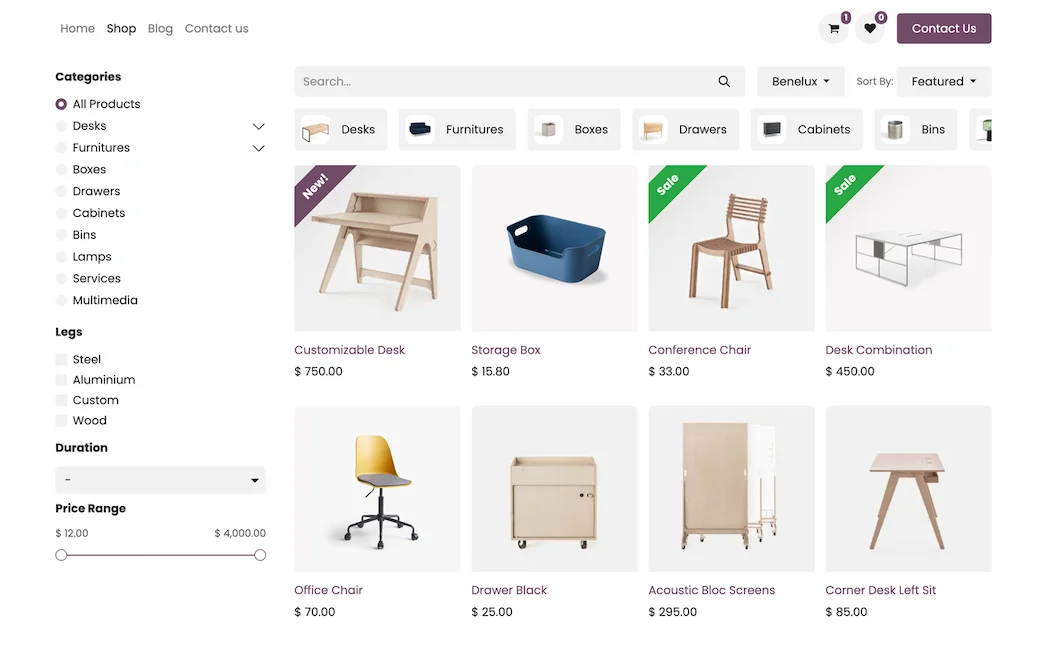
Odoo online store catalogue with products and filters · Nextdoo, Official Odoo Partner
Table of Contents
1. What is Odoo for Retail?
Odoo is an open-source, modular ERP with over 82 applications integrated into a single database. For a Spanish retail business, the relevant modules are POS, Inventory, eCommerce, Accounting with the official Spanish localisation and CRM for loyalty.
The difference with a pure POS (Lightspeed, Shopify POS, Square) is that Odoo connects the POS with the rest of the operations without syncing between systems: stock is deducted simultaneously in-store and on e-commerce, the issued invoice complies with VeriFactu by default, and accounting reflects the sale on the same day.
The difference with a traditional ERP (Sage, A3, SAP Business One) is the speed of implementation, the user-based licence model and the ease of customising forms with Odoo Studio without programming.
Main source: Odoo Documentation · POS.
2. Key Odoo Modules for Retail
These are the essential modules for a retail business in Spain. Each link leads to the official Odoo documentation page.
| Module | Retail function | Official Documentation |
|---|---|---|
| POS | In-store POS with receipts, discounts, returns, loyalty and cash closing | docs · POS |
| Inventory | Multi-warehouse stock, variants (size, colour), batches, expiry dates and barcodes | docs · Inventory |
| Sales · Pricelists | Channel-specific pricing (B2C / B2B), temporary promotions, customer-specific price lists | docs · Pricelists |
| eCommerce | Online store integrated with the same catalogue and stock as the physical store | docs · eCommerce |
| Accounting | Accounting with the 2008 PGCE and automatically generated AEAT forms | docs · Accounting |
| CRM + Loyalty | Unified customer history, points programme, gift cards | docs · Loyalty |
| Helpdesk | Complaints, warranties and after-sales with customer portal | docs · Helpdesk |
| Studio | Customisation of forms and automation without programming | docs · Studio |
The usual combination for an SME store is POS + Inventory + Accounting with Spanish localisation. E-commerce and CRM are added when operations require it.
3. Hardware compatible with Odoo POS
Odoo POS works on any computer with a modern browser (PC, Mac, Android tablet or iPad). Peripherals connect directly to the POS computer or, in more complex installations, via Odoo IoT Box, a specific device that centralises communication with peripherals.
Supported peripherals
- Receipt printers: ePOS compatible models, especially the Epson TM-T20, TM-T88 and TM-m30 family. The Ethernet network connection allows printing directly from the browser without local drivers (docs · ePOS Certificate).
- Barcode scanners: USB or Bluetooth. They function like a keyboard and require no special configuration. The documentation covers integration with the Barcode module for warehouse flows.
- Scales: integrated via IoT Box for weight-based sales, according to docs · Scale.
- Customer displays: a second monitor that shows the receipt to the customer in real-time (docs · Customer Display).
- Cash drawers: open with the command from the receipt printer (RJ-11 connection).
- Electronic shelf labels: integrated support via Pricer and SES-imagotag (docs · Electronic Labels).
Integrated payment terminals
To accept card payments without manually keying in the amount, Odoo integrates natively with major providers: Adyen, Stripe Terminal, SIX, Ingenico, Mollie, Worldline, Adyen, Razorpay and Viva.com among others, according to docs · Payment Terminals. Bizum is managed via QR code payments.
For stores with high cash movement, Odoo supports Glory and Cashdro cash machines as cash machines.
There is a detailed guide with the 2026 list in the article Certified Hardware for Odoo POS within this series.
4. Tax Compliance in Spain
Odoo's Spanish tax localisation (l10n_es) covers the 2008 General Accounting Plan and the main AEAT forms. These are the modules officially published by Odoo:
| Module | Function | Regulation |
|---|---|---|
l10n_es | Spain Accounting · PGCE 2008 (SMEs, Full, Non-profit) | BOE PGC 2008 |
l10n_es_edi_verifactu | VeriFactu · AEAT verifiable invoicing system | RD 1007/2023 |
l10n_es_edi_TBAI | TicketBAI · Álava, Bizkaia, Gipuzkoa | Regional Treasury |
l10n_es_edi_facturae | Facturae EDI · electronic invoicing for public administration (FACe) | Law 25/2013 |
l10n_es_reports | Forms 111, 115, 130, 303, 347, 349, 390 | AEAT |
VeriFactu in 2026
According to Royal Decree 1007/2023, computer systems that issue invoices must implement the VeriFactu system to send each invoice to the AEAT with a chained verification hash. Odoo's official module (l10n_es_edi_verifactu) generates these JSON files and maintains the chaining, according to the official documentation of the Spanish localisation.
Activation requires uploading the issuer's digital certificate from Accounting → Configuration → Settings. Standard initial configuration takes between 4 and 6 hours with an experienced partner.
TicketBAI
If your retail business has stores in the Basque Country, the l10n_es_edi_TBAI covers the regional treasuries. Invoices are digitally signed, sent every 24 hours in XML format and include a verification QR code printed on the PDF invoice.
AEAT Forms Generated by Odoo
With well-categorised accounting, the l10n_es_reports automatically generates:
- Form 303: quarterly or monthly VAT settlement
- Form 390: annual VAT summary
- Form 347: annual declaration of operations with third parties >3,005.06 €
- Form 349: intra-community transactions
- Form 111 / 115 / 130: withholdings and fractional payments
Each form is exported in the official AEAT format, ready for submission.
5. Retail Sectors where Odoo Fits
Not all retail businesses operate in the same way. Some sectors require specific functionalities that Odoo covers with standard modules. These are the areas where Nextdoo has published specific guides:
Fashion and Textile
Complex variants (size x colour x season), price lists with seasonal discounts, management of returns for wrong size.
Stationery
Extensive catalogue with various brands, with applicable Kit Digital, POS with simple receipts and flexible returns.
Hardware store
Long reference lists (tens of thousands of SKUs), sales by weight, B2B + B2C and connection to supplier catalogues.
Optician
Customer health record, prescription management, product warranties and appointment management.
Food
Batch traceability, expiry dates, sales by weight (IoT scales) and cold storage.
Jewellery
Traceability of unique items (serial number), anti-fraud, price list by carat and gold price.
Cosmetics and Perfumery
Multi-brand, sample management, gift with purchase and e-commerce with a premium experience.
Sporting goods store
Complex variants, B2B kits (clubs), equipment rental, flexible online returns.
Pets and Veterinary
Record per pet, vaccine reminders, pet food subscriptions, clinic scheduling.
Bookstore
ISBN identification, editorial consignment, returns to publisher and author signings.
If your sector is not listed here, we can discuss it in a Discovery call to assess if Odoo fits and with which modules.
6. Omnichannel: store + online + marketplaces
The modern retail customer expects to be able to buy online and return in-store. Odoo covers this workflow out-of-the-box when correctly configured:
Unified stock between store and e-commerce
Each product has a single record with a stock level that is deducted in real-time from the POS or the website. Replenishment rules between warehouses are configured in Inventory, according to the Warehousing Documentation.
Click and Collect
The customer buys online and chooses a physical store for collection. The system reserves stock in that store and creates a picking order. This is explained in the article Click and Collect in Odoo for Retail in this series.
Omnichannel Returns
The customer buys online and returns in any store. The system recognises the original receipt (physical or digital), updates the stock and generates the corrective invoice. Details in Omnichannel Returns in Odoo.
Connected marketplaces
Odoo connects with Amazon, eBay, Carrefour and other marketplaces through specific connectors published on Odoo Apps or through integration with Mirakl. Stock synchronisation is configured in real-time to prevent overselling.
Digital gift card
Online purchase of a voucher with a QR code redeemable in any shop, integrated with the Loyalty module. See guide Digital gift card with QR in Odoo POS.
7. Odoo vs. Other Retail POS Systems
Each tool solves a different case. We have published balanced comparisons (advantages and disadvantages of each option) with their corresponding official documentation as a source:
- Odoo POS vs Lightspeed Retail 2026
- Odoo POS vs Shopify POS Pro 2026
- Odoo POS vs Square 2026
- Odoo POS vs Caja Mágica
- Free POS vs Odoo POS · when to make the leap
- Odoo POS vs Hiopos Cloud
- Best ERP for retail in Spain 2026 · 8 options compared
No comparison concludes that Odoo is always the best option. Each decision depends on volume, budget, team, and details.
8. Specific retail operations · step-by-step guides
These technical guides cover the most frequent day-to-day retail questions with Odoo:
- Configure size and colour variants in Odoo POS · step-by-step
- Cycle counting in Odoo for retail · ABC method
- Connect a Honeywell reader to Odoo POS
- Print Epson TM fiscal receipts in Odoo
- Integrate SEUR Frío with Odoo Ecommerce
- Multi-store in Odoo · manage several points of sale
- Odoo POS offline · works without internet
9. Pricing and Implementation
The total cost consists of two parts:
Odoo subscription
Billed by Odoo SA directly to the client, according to the chosen plan. Check updated prices at odoo.com. Guarantees updates, support and hosting (on the Online plan or odoo.sh).
Nextdoo services
Implementation, data migration, training, support and customisations. Reference rate 85 €/hour, subject to review according to scope. Calculator with breakdown.
As a general guide for the Odoo partner sector in Spain, implementation services fall within these ranges:
- Freelancers and micro-SMEs: from 3,000 € (~40 h). Includes invoicing + VeriFactu, basic CRM and training.
- Standard retail SME: from 9,000 € (~120 h). Includes sales, complete Spanish accounting, inventory, CRM, data migration, training for 3 roles and 30 days of hypercare.
- Chains and omnichannel: from 15,000 € (~200 h or more). Includes multi-store, advanced vertical (POS / Ecommerce / manufacturing), integrations and 60 days of hypercare.
Important: figures are indicative and do not constitute a binding offer. The final quote is provided in writing after the free discovery call.
10. Frequently Asked Questions
Official sources and references
Shall we start with your specific case?
30 minutes of free discovery with Jeanlouis Boulanger. No obligation. Written quote within 48 hours if we are a good fit.
Book a discovery call Prueba Odoo 28 díasNextdoo · Official Odoo Silver Partner in Spain · JLM Business Solutions SL B16842831 · Tarragona
Nextdoo · Official Odoo Silver Partner specialising in retail
Frequently asked questions
What does a retail business need in Odoo?
A POS that works with and without connection, a single inventory for shop and web, and connected accounting, all in the same system.
Does it work for both physical and online stores at the same time?
Yes. That's the strong point: a single stock and a single accounting for all channels.
Can I start with just the POS?
Yes. We recommend starting with what saves you the most, and then expanding towards e-commerce and advanced inventory.
Does it comply with Spanish invoicing requirements?
Yes, including adaptation to VeriFactu.
How long does it take to implement?
The core is usually operational within about 30 days, depending on the business size.
Resources and related links
Official information: Official Odoo Documentation.
Explore Odoo by sector and by module
Choose your sector, discover Odoo modules or compare with other solutions. All connected, in a single system.