

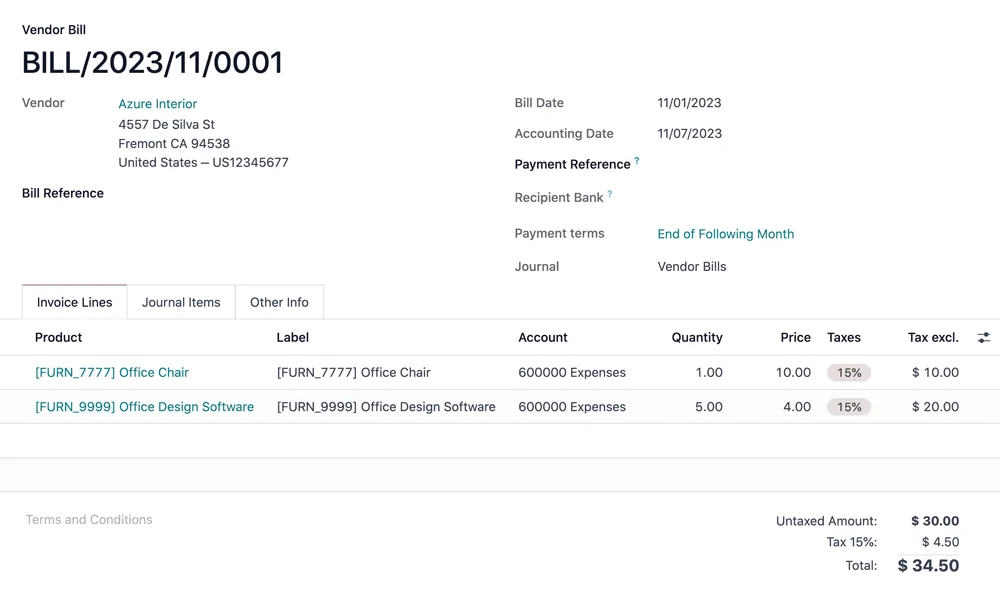
Vendor bill in Odoo Accounting · Nextdoo, Official Odoo Partner
Three pains that disappear
The problem
Manual monthly closing that takes hours
How we solve it
Automated closing with adjustment entries, corrections, and reclassifications.
The problem
Manual bank reconciliation
How we solve it
CSV/N43 import from Sabadell, BBVA, Santander, and La Caixa. Automated matching.
The problem
AEAT tax forms in Excel every quarter
How we solve it
Automatic generation of forms 303, 347, 349, 390, 111, and 115 from your accounting records.
Real Odoo Accounting
Actual Odoo screenshot. This is what your team will see every day.
How businesses like yours use it
Real Case
Stress-Free Month-End Close
Adjusting entries, accruals and deferrals, automatic depreciation. Locking of closed periods. Monthly profit and loss statement generated at close, without Excel.
Real Case
Weekly bank reconciliation
CSV/N43 import from your bank. Automatic matching of receipts with outstanding invoices. Reconciliation in one morning instead of a week.
Real Case
Auto-generated AEAT tax forms
Quarterly Form 303, Annual Form 347, Intra-community Form 349, Annual VAT summary Form 390. Automatically generated from the accounting entries for the period. You review and submit.
What's included
Spanish Chart of Accounts
Pre-installed Spanish chart of accounts. Configurable accounts and sub-accounts.
VAT SII and VeriFactu
Integrated AEAT compliance. Support for special schemes and exempt transactions.
Bank reconciliation
Statement import (CSV/N43), automatic reconciliation with outstanding entries.
Automated closing
Adjusting entries, accruals and deferrals, automatic depreciation. Period locking.
Real-time reporting
P&L, balance sheet, treasury, cash flow. Configurable dashboards.
AEAT tax forms
303, 347, 349, 390, 111 and 115 automatically generated from accounting entries.
Four phases. No surprises.
We understand your current operations, the systems you use, the teams involved, and your priorities. Outcome: a scope agreed in writing and a milestone plan.
We configure the module in your Odoo: fields, views, automations, and integrations with neighbouring modules. We iterate with you within a week.
If you are coming from another system, we migrate your data in a test environment. We validate balances, reconciliations, and records point by point before go-live.
Your team learns in practical sessions with your real data. After go-live, you move to monthly support with an SLA and hours for improvements.
Questions frequently asked questions about Odoo Accounting
Does it come with the Spanish chart of accounts by default?
Yes. Pre-installed Spanish chart of accounts with accounts and sub-accounts. Adaptable to your sector (SME Chart of Accounts, Standard Chart of Accounts).
Does it automatically generate Form 347?
Yes. It calculates transactions >€3.005,06 per third party per year. It generates the AEAT file ready for submission.
How does bank reconciliation work?
You import the bank statement (CSV/N43). Odoo suggests matching it with pending entries. You validate it with a click. Time: 1 hour per month compared to 1 day the traditional way.
Can I close the financial year without an advisor?
Automated and guided closing: adjustment entries, corrections and opening entry for the new financial year. Your advisor just reviews.
It integrates with the rest of your Odoo
No duplicate data. No broken synchronisations.
Complementary modules
Swipe to see more → or click on any


Why manage your accounting with Odoo
Odoo Accounting is tailored for Spain: journal entries, taxes, tax forms, and bank reconciliation in a system connected with sales and purchases. Data arrives already recorded — no need to re-enter it.
Semi-automatic bank reconciliation and real-time reports give a clear picture of your financial situation at any time, not just at quarter-end.
It complies with tax obligations and adapts to verifiable invoicing required by regulations. At Nextdoo, we configure it with your accounting firm so that everything aligns.
Working as a team with your accounting firm
Odoo Accounting doesn't replace your accounting firm: it complements it. Your adviser can access already recorded data and real-time reports, meaning closings are faster and there's less back-and-forth with documents. At Nextdoo, we configure the chart of accounts, taxes, and tax forms to fit your activity, and define who does what, so that day-to-day accounting flows without duplicating work between your team and your adviser.
Related resources and links
Official information: Tax Agency — official information on invoicing and VeriFactu.
One Odoo, all modules connected
Every module fits together. Explore other Odoo modules and the industries where we implement them.