
Odoo 19 new features: what changes for your SMB in 2026
Each new version of Odoo brings improvements that directly affect your company's day-to-day work. In this guide we review the most relevant Odoo 19 new features for an SMB in 2026, focusing on what really matters: working faster, with fewer headaches and with reliable data to make decisions.
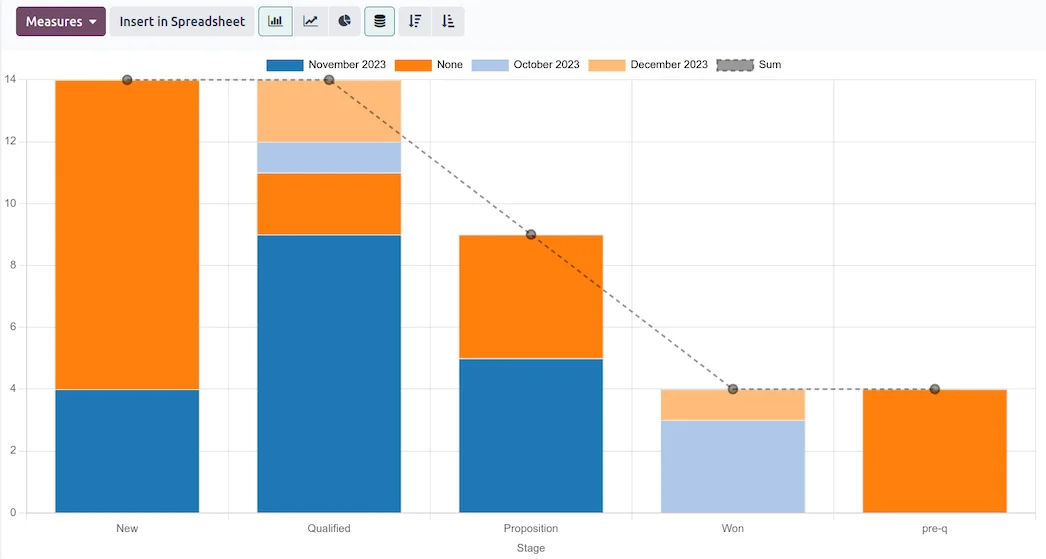
Reports and sales dashboard in the Odoo CRM · Nextdoo, Odoo Silver Partner
What is Odoo 19 and why it matters to you as a manager
Odoo is the management system that brings together sales, invoicing, inventory, accounting, purchases, projects and much more in a single place. Every year it releases a new version with improvements, and Odoo 19 is the benchmark for companies looking to modernise their management in 2026.
As a manager you don't need to know the technical details. What matters is that the Odoo 19 new features aim to help your team waste less time on repetitive tasks and give you a clear picture of the business at any moment. Fewer scattered spreadsheets and fewer programmes that don't talk to each other.
More performance: the application runs faster
One of the recurring areas of focus in every version of Odoo is performance. In practice, this translates into screens that load faster and processes that respond more smoothly, something you notice when several people use the system at the same time.
For an SMB this matters more than it seems. A team that isn't waiting for screens to load serves customers sooner, invoices faster and works with less frustration. It's a quiet improvement, but one that's felt in daily operations.
Usability: a clearer, easier-to-use interface
Odoo pays close attention to the user experience, and each version tends to refine the interface to make it more intuitive. The goal is for someone new to the company to learn the essentials in a short time, without needing an endless manual.
An easy-to-use tool is a tool people actually use. When the team feels comfortable, data is entered correctly and on time, and that's the foundation of reliable information. In any rollout project, team adoption is just as important as the technology itself.
Artificial intelligence built into management
Artificial intelligence is one of the main highlights of this stage. The underlying idea is simple: the system helps you draft text, summarise information or speed up administrative tasks, so your team spends time on what adds value.
It's worth approaching it with perspective and honesty. AI is an aid, not a substitute for your team's judgement, and how much you get out of it depends on how it's configured for your specific case. If you want to understand which uses make sense for your business, we explain it in detail on our page about artificial intelligence in Odoo.
Improvements by area: sales, inventory and finance
The new features in each version are usually spread across business areas. In sales, the focus is on closing deals and issuing quotations in fewer steps. In inventory, on having tighter control of stock and logistics. In finance, on simplifying invoicing and the accounting close.
Not every improvement applies the same way to every company. A retail business doesn't make the most of the same features as a services company. That's why the sensible approach is to start from your real processes and see which new features truly help you, instead of enabling everything by default.
Should I upgrade to Odoo 19? How to approach it without risks
Upgrading to a new version is a decision worth planning. If you already use Odoo, it's a good idea to review how the change affects your customisations and your way of working before taking the step, so the improvement doesn't bring surprises.
If you're not yet using Odoo, starting straight away with a recent version is a good foundation for the years ahead. As for cost, it depends heavily on the scope and the number of users, so it only makes sense to give a rough range once we know your case (reference estimate, not binding). As an Official Odoo Partner, we support you throughout the entire Odoo implementation project, and if you prefer to see it for yourself, you can request a free trial with no commitment.
Frequently asked questions
What do the Odoo 19 new features offer an SMB?
In business terms, the Odoo 19 new features aim to help you work faster and with fewer headaches: a faster application, a clearer interface and artificial intelligence assistance for administrative tasks. The goal is for your team to spend time selling and serving customers.
Is it worth upgrading to Odoo 19 if I already use an earlier version?
It's usually worth it, but it should be planned. Before upgrading, you need to review how the change affects your current customisations and processes. With a prior analysis, the move to Odoo 19 is done in an orderly way, taking advantage of the new improvements without disrupting your operations.
Does Odoo 19's artificial intelligence replace my team?
No. The built-in AI is an aid to speed up tasks like drafting text or summarising information, but it doesn't replace people's judgement. The result depends on how it's configured for your business. Used well, it frees up administrative work time to devote to what matters.
How much does it cost to implement or upgrade to Odoo 19?
The cost depends on the scope of the project, the number of users and the areas you want to cover, so any figure given without knowing your case wouldn't be serious. After an initial analysis we can give you a rough range (reference estimate, not binding) tailored to your company.
Can I try Odoo 19 before deciding?
Yes. You can request a free trial to see the system from the inside and assess whether it fits your way of working. It's the most honest way to decide: first you see it working and, if it convinces you, we plan together an implementation tailored to your business.
Related resources
Official information: Official Odoo documentation.
Explore Odoo by sector and by module
Choose your sector, discover Odoo modules or compare with other solutions. Everything connected, in a single system.