

Three pains that disappear
The problem
Shift spreadsheets that break with the first change
How we solve it
Visual drag & drop. Changes reflected instantly. Versioned history.
The problem
Over-assigning people without realising it
How we solve it
Automatic overlap detection. Visual alerts in red.
The problem
You don't know if the plan is being met
How we solve it
Comparison of planned versus actual (with timesheets). Deviation report.
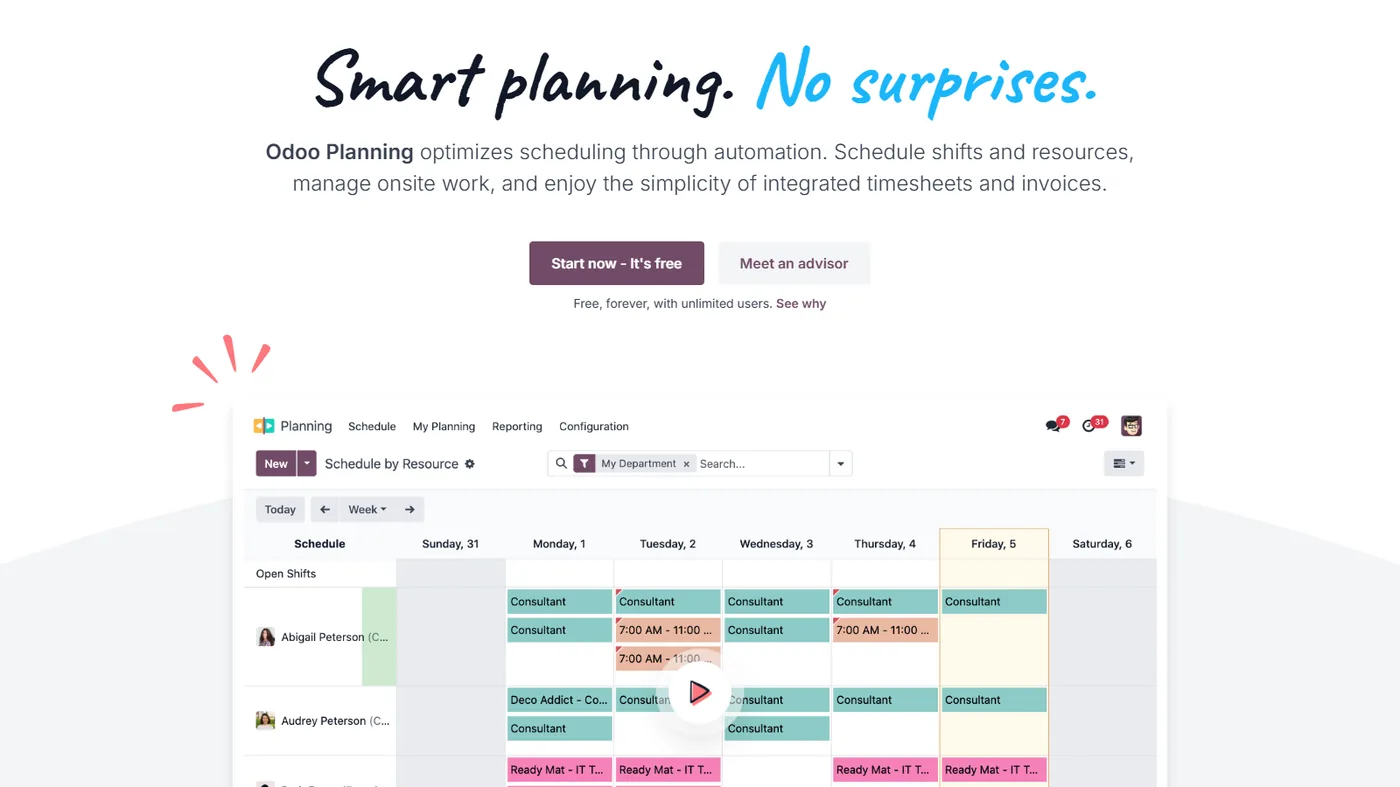
Real Odoo Planning
Real screenshot of Odoo. This is what your team will see every day.
How businesses like yours use it
Real case
Technical services team
Technicians with rotating shifts and on-call duties. Gantt view with drag & drop, overlap detection, shift templates. Employee notifications about their schedule.
Real case
Restaurant with split shifts
Front-of-house staff on morning/afternoon shifts and rotating days off. Capacity per day/time slot, alerts if staff are short during peak hours.
Real case
Consultant with project assignments
Consultants assigned to projects in time blocks. Total capacity view, over-assignment detection. Comparison of planned versus actual with timesheets.
What it includes
Gantt View
People and projects in rows. Shifts as blocks with drag & drop.
Overlap detection
Visual alerts if you assign someone to two places at once.
Shift templates
Morning/afternoon, weekends, on-call shifts. Apply it to several employees at once.
Employee notifications
Email or push with their weekly schedule. Changes are notified instantly.
Capacity by department
Sums planned hours against available hours. Detects overload.
Comparison with timesheets
Planned vs. actual executed. Variance reporting per person.
Four phases. Zero surprises.
We understand your current operations, the systems you use, the teams involved and your priorities. Result: a written, defined scope and a milestone plan.
We configure the module in your Odoo: fields, views, automations and integrations with neighbouring modules. We iterate with you within a week.
If you are coming from another system, we migrate your data in a test environment. We validate balances, reconciliations and records point by point before go-live.
Your team learns in practical sessions with your real data. After implementation, you move to monthly support with an SLA and hours for improvements.
Questions frequently asked questions about Odoo Planning
Does it support rotating shifts?
Yes. Shift templates (morning/afternoon/night), applied to several employees at once, with automatic rotation.
Does it detect overlaps in planning?
Yes. If you schedule someone in two places at once, you receive a visual alert in red. Overlaps are avoided before publishing.
Does it notify employees of their schedule?
Yes. Automatic email/push. Changes are notified instantly. Employees see their week from their portal.
Can I compare what was planned versus what was executed?
Yes, by connecting it with timesheets. Deviation report by person/project. Useful for adjusting future planning.
It integrates with the rest of your Odoo
No duplicate data. No broken synchronisations.
Complementary modules
Swipe to see more → or click on any


Why plan resources with Odoo
Odoo Planning allows you to assign shifts, tasks, and resources with a clear calendar view, avoiding overlaps and gaps. Everyone knows what they are doing and when.
By integrating with projects and sales, the workload is planned according to real demand, not by guesswork.
It is useful for service, installation, or support teams. We configure it to fit your operations and shifts.
Ideal for service teams
Odoo Planning fits particularly well with teams that provide services, carry out installations, or offer home support. Seeing at a glance who is available and how much workload they have avoids overlaps and downtime. At Nextdoo, we connect it with projects and sales so that the schedule fills up according to the business's real demand, and we adapt the views and shifts to how your team organises its work.
Related resources and links
Official information: Official Odoo documentation.
A single Odoo, all modules connected
Each module fits with the rest. Explore the other parts of Odoo and the sectors where we implement them.