
In project-based companies —agencies, consultancies, installers, design studios, service providers— profit margins slip away due to tasks that drag on, unrecorded hours, and projects concluded without knowing if they were profitable. Odoo Projects organises the work, tracks hours, and connects the project with sales and invoicing, so you know the real margin whilst you can still react. This guide explains what it is, how it works, and what your business stands to gain.
En 30 segundos. What is Odoo Projects, what it's for & how it works: tasks, kanban, timesheets, planning & project profitability, integrated with sales and...
What Odoo Projects is and its purpose
Odoo Projects is the tool you use to organise and track the work your company carries out by assignments or projects. It helps you keep tasks and their status clear, know who does what, log dedicated hours, and —most importantly— understand if each project is profitable. It's especially useful in businesses where the product is the team's time and expertise. The complete approach is on the page for Odoo Projects.
What you can do with Odoo Projects
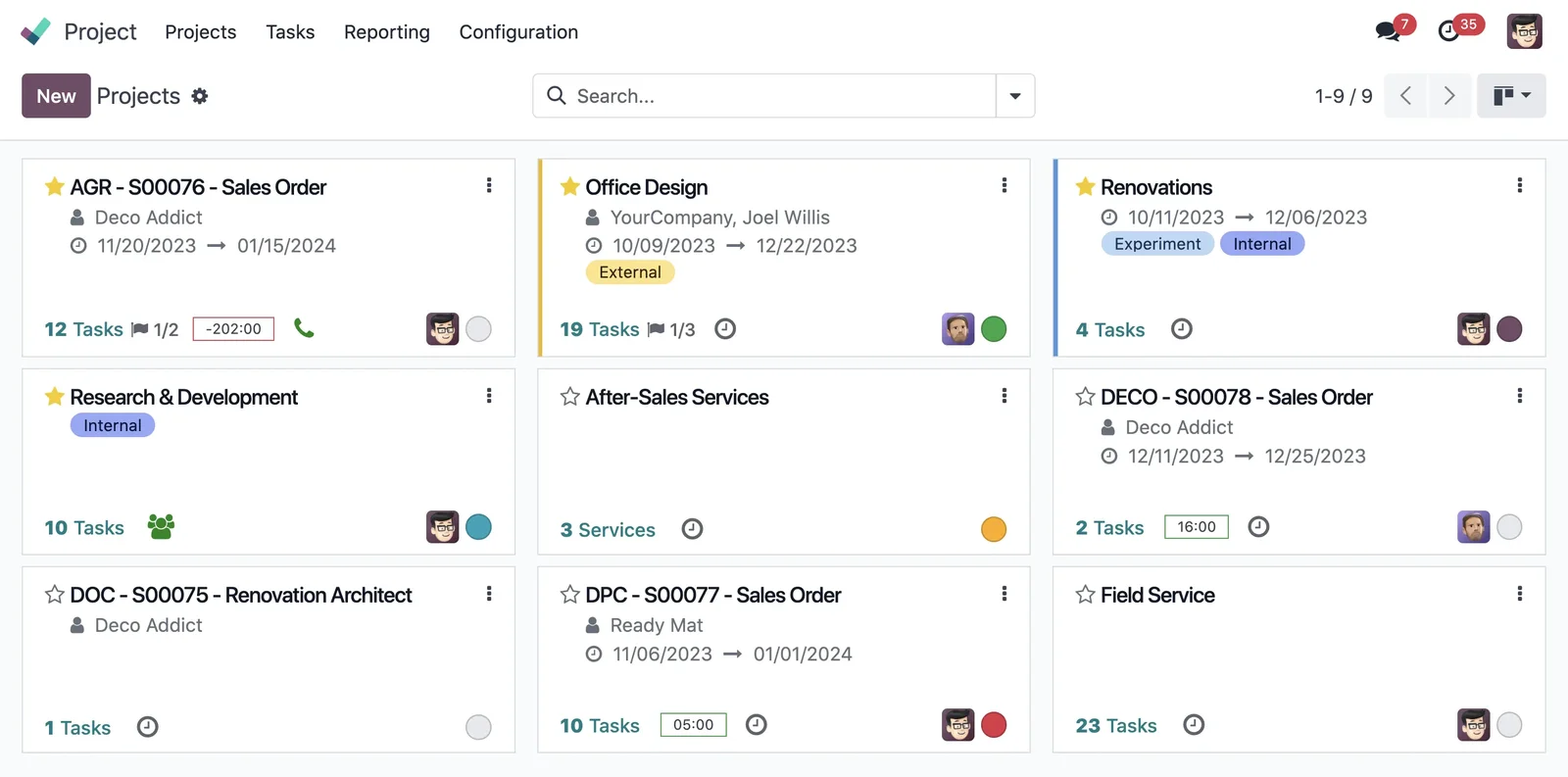
- Organise work into projects and tasks, with a visual kanban board.
- Log timesheets to know how long each task takes.
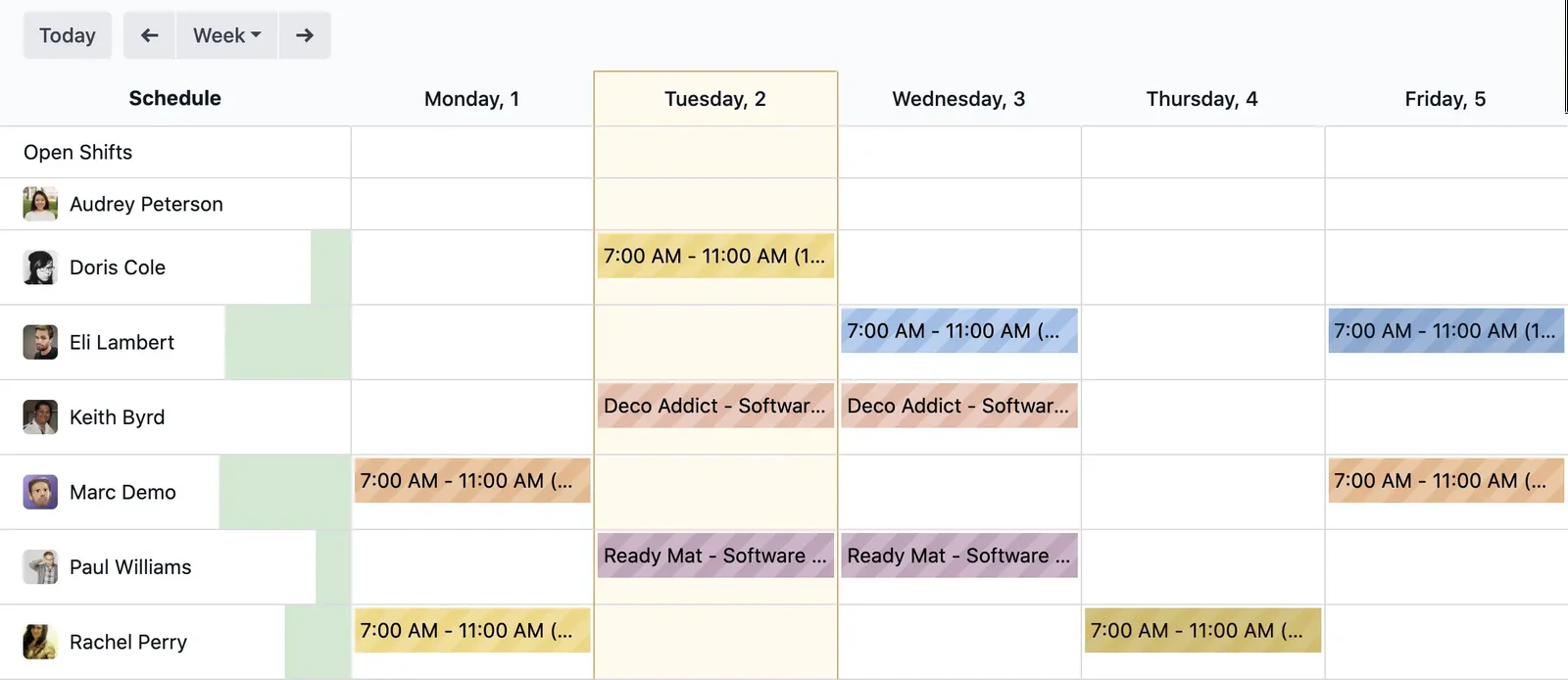
- Plan the team and view the workload.
- Track the status of each project at a glance.
- Invoice by project, by hours, or by milestones; see Odoo Invoicing.
- Measure the real profitability of each project.
How Odoo Projects works step-by-step
Step 1 · Create the project and its tasks
The project is registered with its client and broken down into tasks, organised by stages on a kanban board. Deliverable: structured project.
Step 2 · Assign and plan
Each task is assigned to an individual and planned, so the team's workload and what needs doing are visible. Deliverable: distributed work.
Step 3 · Log hours
The team logs the hours dedicated to each task, simply, to know the real cost of the project. Deliverable: controlled hours.
Step 4 · Track progress
Tasks progress across the board, and the project status is visible without asking anyone. Deliverable: visible progress.
Step 5 · Invoice and measure profitability
The project is invoiced —by hours, by milestones, or at a fixed price— and, with recorded hours and imputed costs, the real margin is visible. Deliverable: project invoiced and measured.
The key advantage: knowing if each project is profitable
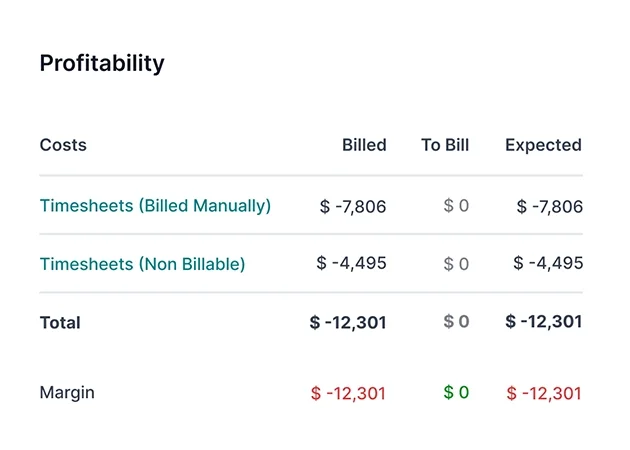
The difference with Odoo, compared to managing projects in a spreadsheet, is that the project is linked to hours, sales, and invoicing. You log team hours and associated purchases, and Odoo compares them with what was budgeted and invoiced, so you know the real margin of each project whilst it's active, not six months later. For a service business, that overview changes everything: you discover which types of projects and clients generate money and which eat into it, and you make decisions based on data instead of the feeling that 'we've worked a lot this year'.
What your business gains with Odoo Projects
- Know the real margin of each project, not an end-of-year estimate.
- Avoid losing unbilled hours, with up-to-date timesheets.
- Organised and visible work, without asking about the status of each task.
- Make data-driven decisions on which projects and clients are worthwhile.
Who Odoo Projects is for
It suits any company working on projects or assignments: agencies, consultancies, architecture or engineering studios, installers, service companies, maintenance firms. The more impact team hours have on the cost, the more noticeable the benefits. If your business is purely product-based without projects, it might not be your priority; in services, controlling projects usually protects the margin most effectively.
An example: a service project from start to finish
Let's follow a typical assignment in an agency. A service sale is closed, and from the order, the project is created with its tasks distributed by stages. The team works and logs their hours for each task —an afternoon here, two hours there— and the manager sees the progress on the board without having to ask. Halfway through, they check how many hours have been consumed versus budgeted, and detect that a phase is overrunning, so they adjust before it eats into the margin. Upon completion, the project is invoiced —for actual hours or at the fixed price— and, with everything recorded, the real margin is visible: this project made money, that other one barely. This project-by-project information is what allows a service business to grow intelligently instead of working hard to earn little.
Common mistakes in project management
Common pitfalls: not logging hours and having no idea how much each project costs; managing projects in spreadsheets that don't integrate with sales or invoicing; finding out a project went wrong when it's already finished and nothing can be done; and invoicing by the hour without actually having logged the hours. All of these are avoided with an integrated project module, where hours feed into the cost, the project links with sales and invoicing, and the margin is visible in real-time. The key is to set up timesheets and the project structure to suit your way of working from the outset, with a partner who understands your sector; it's advisable to choose wisely.
How to get started with Odoo Projects
You can start with Projects alongside sales and invoicing, or set it up as part of an implementation. The framework is in Odoo implementation and cost details in how much Odoo costs. The sale that originates the project is managed in Odoo Sales.
Client and internal projects in the same place
Odoo Projects isn't just for work you invoice clients for: it also organises internal projects, those that consume team time even if they're not directly billed. A marketing campaign, the launch of a new line, an internal improvement… all of these are projects with their tasks and hours, and managing them in the same system gives you a complete overview of where your team's time is being spent. That matters more than it seems: many companies discover, when measuring it, that a significant portion of effort goes into internal work that no one was tracking. Having client and internal projects in the same tool, with their hours, allows for balancing the workload, prioritising what truly adds value, and preventing internal work from eating into time that should be spent on billable activities.
Frequently Asked Questions
What is Odoo Projects?
It's the Odoo module for organising work by projects and tasks, featuring a kanban board, timesheets, planning, and project-based invoicing, integrated with sales and invoicing.
Is it useful for knowing if a project is profitable?
Yes. By recording hours and costs and comparing them with what's been invoiced, Odoo displays the real margin of each project whilst it's active, not at the end.
How are hours logged?
With simple timesheets: each person logs the time dedicated to each task, and these hours feed into the project cost.
Can I invoice by hours or by milestones?
Yes. Odoo allows invoicing by hours worked, by milestones, or at a fixed price, depending on how you work with each client.
Does it integrate with sales?
Yes. A service order can generate the project, and the project is invoiced, linked to the sale, without re-entering data.
Is it suitable for an agency or a consultancy?
Yes, it's one of their ideal use cases: businesses where the product is the team's time, and knowing the margin per project makes all the difference.
Is it difficult to use?
No. The kanban board is intuitive and logging hours is straightforward; this ease of use is key for the team to genuinely adopt it.
Can I view the team's workload?
Yes. The planning shows what each person has on and helps distribute work without overwhelming anyone.
How much does Odoo Projects cost?
It depends on the scope and whether you use it standalone or with sales and invoicing. The details, without arbitrary figures, are in the guide on how much Odoo costs.
Do you want to know if each project genuinely makes you money?
At Nextdoo, an official Odoo partner, we configure Odoo Projects with timesheets and profitability, linked to sales and invoicing. Start by Odoo Projects or request a diagnosis of your way of working.
Source: official Odoo documentation (Project). Indicative and non-binding figures.
Sources
Official sources consulted: official Odoo documentation y electronic headquarters of the Tax Agency (VeriFactu). Indicative and non-binding cost and timeframe figures, subject to variations depending on the project.