
Automate Odoo with AI: workflows that save your team hours
Every day your team wastes time on repetitive tasks: reading emails, sorting tickets, writing the same message over and over. Automating Odoo with AI doesn't mean replacing anyone; it means taking that mechanical work off their plate so people can focus on what truly adds value. Here we explain how, with real-world examples.
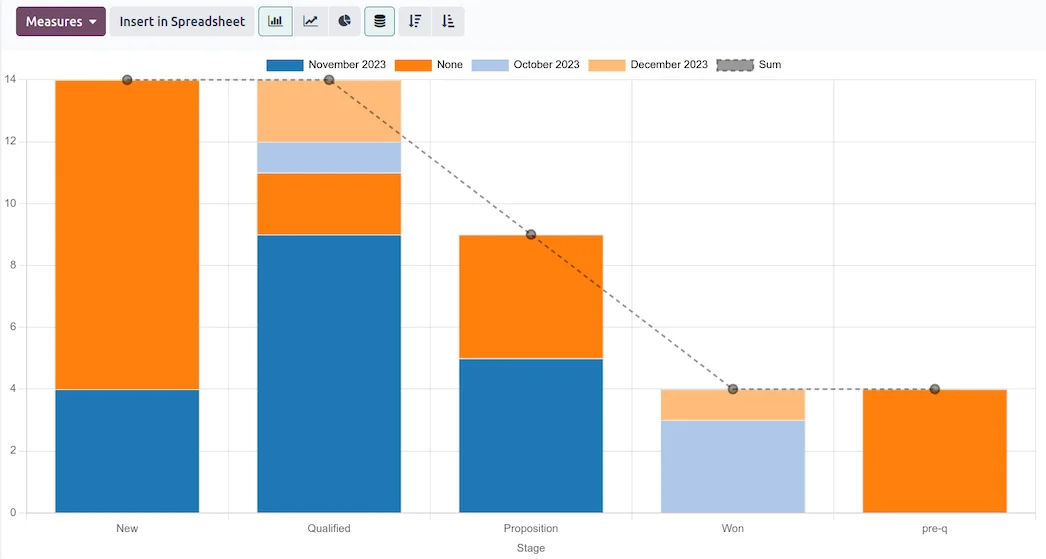
Reports and sales dashboard for Odoo CRM · Nextdoo, Odoo Silver Partner
What automating Odoo with AI means (and what it doesn't)
Odoo already ships with classic automations: rules, templates and workflows that trigger on their own when something happens. Artificial intelligence adds a layer that understands text: it can read an email, a ticket or a note and figure out what it's about, summarise it or suggest a reply. Combining the two is what really saves hours.
Let's be honest: AI isn't right one hundred percent of the time, nor does it magically know your business. That's why automating Odoo with AI is always designed with a person overseeing what matters. AI prepares and organises the work; your team reviews and decides. That division of labour is what delivers results without surprises.
Classifying emails and tickets automatically
One of the highest-return workflows is classification. When an email arrives in the sales inbox or a ticket reaches support, AI reads the message, detects the reason (quote, complaint, shipping detail, invoice) and tags it or assigns it to the right team within Odoo. No one has to read and route everything by hand.
The practical effect is that urgent messages surface sooner and none get lost in a shared inbox. Companies with high daily volume notice the change right away: less time triaging, faster responses and a workload better distributed across the team.
Drafts and replies ready to review
AI can draft the first version of a reply drawing on the information that already lives in Odoo: the customer's history, the status of their order or the terms of a quote. Instead of writing from scratch, your team opens a coherent draft, tweaks it and sends it. The human tone is preserved and you gain speed.
The same applies to product descriptions, sales follow-up messages or standard support replies. The key is that the draft is never sent on its own: it always passes through a person. That way you harness the speed of AI without giving up the judgement of someone who knows the customer.
Summaries and alerts that save meetings
A lot of hours go into catching up. AI can generate automatic summaries of a long email thread, of the notes on an opportunity or of a project's status, and write them straight onto the Odoo record. Anyone opening the record understands it in a minute without rereading twenty messages.
On top of that come smart alerts: AI detects that a customer has gone days without a reply, that an order has stalled or that an important opportunity is cooling off, and fires an alert to the person in charge. These are reminders that used to depend on someone remembering, and now trigger on their own.
Sales follow-ups so nothing slips through the cracks
In sales, money is lost to things forgotten. A common workflow is for AI to review the open opportunities, spot which ones need a nudge and prepare a follow-up message tailored to each case, ready for the salesperson to approve. The pipeline keeps moving without relying on anyone's memory.
It also helps after a sale: renewal reminders, satisfaction surveys or repurchase prompts at the right moment. Everything is logged in Odoo, so the customer's history is always complete and anyone on the team can pick the relationship back up without losing context.
How this is set up in your Odoo, step by step
There's no need to transform the whole company at once. The sensible approach is to start with one or two workflows that already hurt (for example, classifying emails and preparing drafts), measure the time they save and expand from there. At Nextdoo we tackle it as part of a well-organised Odoo implementation, with the automations built into your real processes.
If you want to dig deeper into the available AI capabilities, we have a page dedicated to Odoo and artificial intelligence where we explain it at length. And if you'd rather see it working before deciding, you can request a free trial and assess the fit with your team. As for cost, every project is different: we work with custom quotes based on scope (reference estimate, non-binding).
Frequently asked questions
Do I need technical knowledge to automate Odoo with AI?
No. We handle the technical side during the rollout. Your team simply interacts with Odoo as always: it receives pre-classified emails, drafts ready to review or automatic alerts. The goal is for day-to-day use to be simple and require no IT training.
Will the AI send emails to my customers on its own?
Only if you decide so. The recommended approach is for AI to prepare the drafts and a person to review them before sending. You can fully automate very simple messages, but for sensitive communications we always keep a human checkpoint to protect the customer relationship.
Is automatic classification of emails and tickets reliable?
It gets it right in the vast majority of cases and improves how work is distributed, but it's not infallible. That's why it's configured with room for review: ambiguous messages are flagged for someone to look at. The idea is to reduce manual work, not to remove oversight entirely.
How much does it cost to implement AI automations in Odoo?
It depends on the number of workflows, the volume of messages and your current Odoo setup. We work with custom quotes once we understand your case, and we can start with a reduced scope to measure results (reference estimate, non-binding).
How long does it take to see the hours saved?
Simple workflows, such as classifying emails or generating drafts, are usually noticeable within a few weeks of going live. The norm is to start with one or two specific processes, check the time they free up for the team and then expand to more areas with real data.
Related resources
Official information: Official Odoo documentation.