
In summary. Odoo integrates with SEUR via connectors available on the official marketplace. The integration automates tariff calculation at checkout, label generation, shipment tracking, and customer email notifications. For SEUR Frío, Odoo allows products to be marked as refrigerated and automatically assigns this service when the order requires it, without manual intervention.
If you have an online shop in Spain and use Odoo, sooner or later you'll wonder how to connect your logistics operator so everything flows without manual intervention. SEUR is one of the most established couriers in the Spanish market, and its SEUR Frío variant is practically mandatory if you sell food, sensitive cosmetics, or pharmaceutical products.
Integrating SEUR into Odoo eCommerce automates both conventional and refrigerated shipments, eliminating manual management in the logistics process.
What SEUR offers for Spanish online retail?
SEUR is part of the DPD/Geopost group, one of Europe's largest parcel operators. In Spain, it has a very dense network of depots and delivery points, making it a solid option for SMEs selling nationwide.
Its most relevant services for an online shop are as follows:
- SEUR 24h: next-day delivery within mainland national territory.
- SEUR 10h / 13h: guaranteed delivery before a fixed time, ideal for demanding customers.
- SEUR Frío: temperature-controlled transport between 2 °C and 8 °C, essential for food, active cosmetics, and some parapharmaceutical products.
- SEUR Now: same-day delivery in major cities like Madrid, Barcelona, or Valencia.
- SEUR Predict: the recipient receives a notification with the exact time slot, which reduces missed deliveries and failed deliveries.
Each of these services can be activated and configured from Odoo once the integration is established. The starting point is always to have an active B2B contract with SEUR, because the API for tariffs and labelling requires the customer's own credentials.
Why manage shipments directly from Odoo?
Many Spanish SMEs manage their shipments manually: they export orders, log into the courier's portal, generate labels one by one, and then copy the tracking number to the order. That works when you have ten orders a day. When you reach fifty or a hundred, that process becomes a real bottleneck.
Odoo solves this problem by centralising everything into a single flow. The sales order, the delivery note, the courier label, and the customer confirmation email are all part of the same process. There are no additional windows, no copy-pasting, no risk of assigning the tracking number to the wrong order.
Furthermore, when the integration is well configured, the customer sees the shipping cost calculated in real-time during checkout. Odoo queries the SEUR API with the weight, dimensions, and destination postcode, and returns the exact price according to your negotiated rate. This eliminates discrepancies between what you charge the customer and what the courier bills you.
For an SME selling in Spain, this level of automation is not a luxury. It's the difference between scaling the business or getting stuck in administrative tasks.
How to install and activate the SEUR connector in Odoo?
Odoo has a native system for integrating third-party logistics operators. The basic architecture is officially documented and allows connecting any courier that exposes a standard API. For SEUR specifically, the available connectors can be found on the official Odoo app marketplace.
The installation process follows these general steps:
- Access the applications section within your Odoo instance.
- Search for “SEUR” in the marketplace search bar.
- Review the available connectors: check compatibility with your Odoo version, ratings from other users, and if the developer offers active support.
- Install the connector that best suits your needs.
- Enter the API credentials that SEUR provides to its B2B customers: customer code, user, and access key.
- Configure the basic parameters: origin warehouse, label format, and default behaviour.
An important note: if your Odoo instance is managed by a partner like Nextdoo, it is advisable for the installation to be carried out by the technical team. Some connectors require specific adjustments to function correctly with Spanish fiscal configuration or with the type of shop you have set up.
SEUR API credentials
SEUR does not automatically provide API access when contracting their service. You have to expressly request it from your SEUR account manager or through the customer area. The process is usually quick, but it's advisable to request it before starting the integration to avoid blocking the project.
Once you have the credentials, the connector uses them to authenticate in each API call: tariff calculation, shipment generation, label printing, and tracking query.
Configure tariffs, zones and shipping rules
Installing the connector is just the first step. The part that has the most impact on the customer experience is the configuration of tariffs and courier assignment rules.
Odoo allows you to define shipping methods with very specific conditions. You can create a “SEUR 24h mainland” method that is activated only when the destination is mainland Spain and the order weight does not exceed a certain limit. You can create another “SEUR Frío” method that is automatically activated when the basket contains at least one product marked as refrigerated. And you can create a “SEUR 10h” method that the customer can voluntarily select by paying a supplement.
Some common configuration rules in Spanish eCommerce projects:
- Free shipping from a minimum order amount, using SEUR 24h as the base service.
- Automatic assignment of SEUR Frío when the order includes cold chain products, regardless of what the customer chooses.
- Restriction of certain services to specific geographical areas: for example, SEUR Now only available for Madrid and Barcelona postcodes.
- Real-time tariff calculation by querying the SEUR API, with fallback to a manual table if the API does not respond.
Each of these rules is configured within Odoo without the need for any programming. It's pure configuration, not development.
Integration with the online shop checkout
When a customer reaches the shipping step in your Odoo shop, they see the available methods with their updated price. If you have activated real-time calculation, the price displayed is exactly what SEUR will bill you according to your tariff. If you prefer fixed margins, you can add a management fee to the courier's actual cost.
This transparency at checkout reduces cart abandonment. Spanish customers are particularly sensitive to surprises in shipping costs: if the price they see when confirming the order does not match what appeared earlier, trust plummets.
How does the management of refrigerated products with SEUR Frío work?
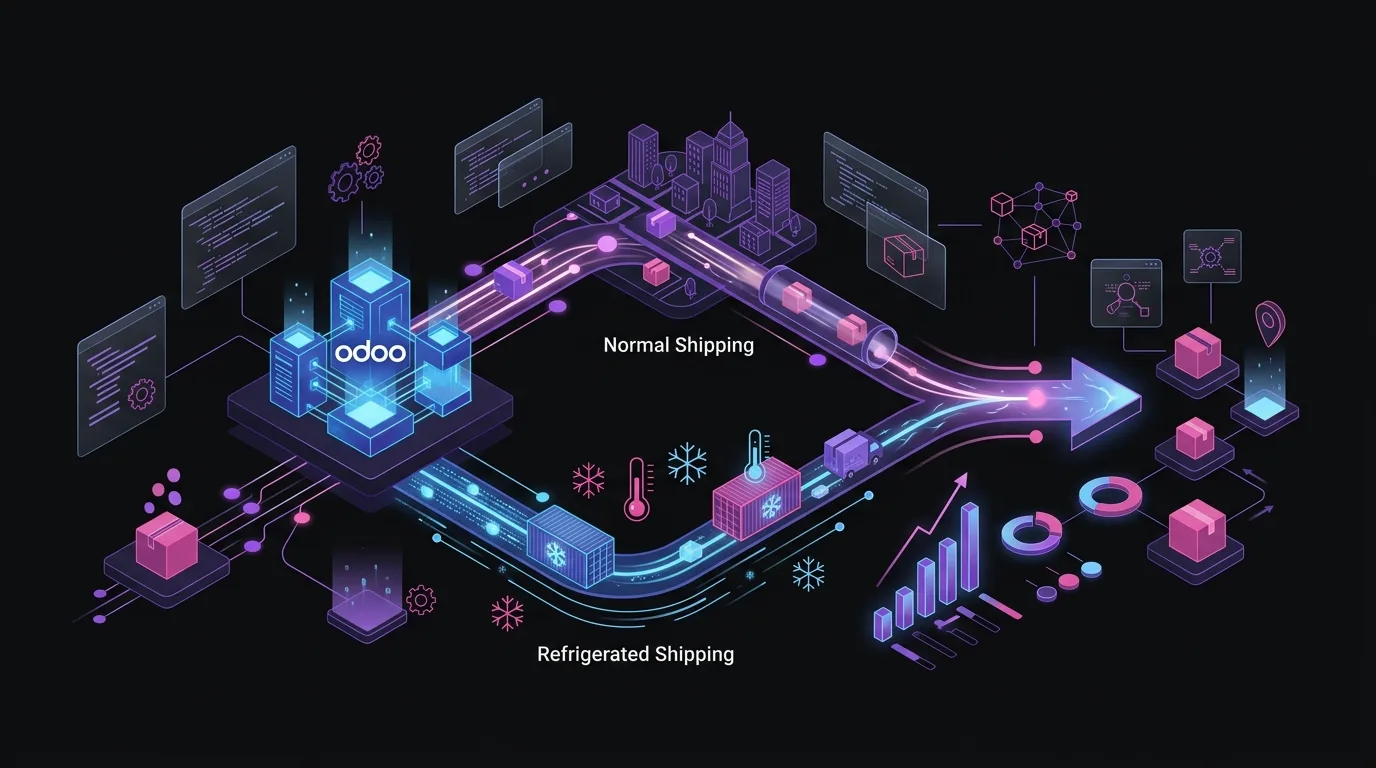
This is the differentiating point for many Spanish SMEs that sell products with temperature requirements. SEUR Frío maintains the cold chain between 2 °C and 8 °C throughout the journey, using approved vehicles and packaging.
In Odoo, managing these products requires specific but simple configuration:
- Identify which products in your catalogue require refrigerated transport.
- Mark these products with an attribute or category that Odoo can recognise as a shipping condition.
- Create a rule in the shipping methods that detects this attribute and automatically assigns the SEUR Frío service.
- Verify that the customer cannot select a standard service if the order contains refrigerated products.
This last point is critical from a responsibility perspective. If a customer selects standard SEUR 24h for an order with yoghurts or veterinary vaccines, the product will arrive in poor condition. The automatic assignment rule for SEUR Frío eliminates that risk.
Some sectors where SEUR Frío has the highest demand in Spanish eCommerce are gourmet food, natural cosmetics with natural preservatives, parapharmacy, and veterinary products.
How are labels generated and shipments tracked?
Once the warehouse operator confirms the shipment in Odoo, the connector automatically executes several actions in sequence.
First, it generates the shipment in the SEUR system via the API. This creates the record on SEUR's side and assigns a unique tracking number. Second, it downloads the label in PDF format and attaches it to the delivery note in Odoo. The operator only has to print it and stick it to the package. Third, it registers the tracking number in the Odoo order, so both the internal team and the customer can consult it at any time.
The automatic email to the customer includes the SEUR tracking link. No one needs to copy it manually, nor does the customer need to call to ask where their order is.
From the warehouse perspective, the complete flow is as follows:
- Receive the confirmed order.
- Prepare the package.
- Confirm the shipment in Odoo with a click.
- Print the label which already has the SEUR code.
- Hand the package to the delivery driver.
There is no double data entry. There is no risk of human error in the tracking number. There is no need to open the SEUR portal.
Incident and returns management
Logistics incidents are inevitable: damaged packages, lost shipments, incorrect addresses. A good SEUR connector for Odoo facilitates the management of these situations from the same order.
For returns, Odoo has a native flow that can be linked with the generation of SEUR return labels. The customer receives a prepaid label and can drop off the package at any SEUR point. Receipt at the warehouse automatically updates the order status and can trigger a refund.
SEUR within a multi-carrier strategy in Odoo
SEUR is a powerful courier, but it is not always the most suitable for every shipment. A mature logistics strategy in eCommerce usually combines several operators depending on the destination, product type, or required timeframe.
Odoo allows managing several couriers in parallel without friction. You can have SEUR as the main carrier for mainland Spain, Correos for the Canary Islands, GLS for European international shipments, and MRW for certain areas where its coverage is better. Each with its own connector, its own tariffs, and its own assignment rules.
The checkout shows the customer the available methods for their destination and order, calculated in real-time. The customer's selection activates the corresponding connector at the moment of confirming the shipment. All within the same system, without switching tools.
This flexibility is especially valuable for SMEs that have grown and have contracts with several couriers. Centralising logistics management in Odoo eliminates the need to maintain several portals open and reduces the time the team dedicates to repetitive operations.
How do tax compliance and traceability affect 2026 shipments?
In 2026, regulatory pressure on Spanish e-commerce continues to increase. VeriFactu, the AEAT's verifiable invoice registration system, requires every transaction to be recorded with complete traceability. This includes sales from your online shop.
Odoo manages this traceability natively. Each order generates an invoice that is linked to the delivery note, the courier label, and the tracking number. If at any time the AEAT requires justification for a transaction, you have the entire chain documented in a single system.
For businesses operating in the Basque Country or Navarre, the TicketBAI obligation adds another layer of requirements. Odoo with updated Spanish localisation covers these requirements without the need for external solutions.
Integration with SEUR is not just an operational convenience. In the 2026 fiscal context, having the order, invoice, and shipment in the same system is also a guarantee of compliance.
Frequently asked questions
Is there an official SEUR connector developed by Odoo?
Odoo has an official platform for connecting third-party logistics operators, but specific connectors for SEUR are developed by partners and providers in the Odoo ecosystem. You can find them on the official marketplace by searching for “SEUR”. Check compatibility with your version, ratings, and if the provider offers active support. At Nextdoo, we can advise you on which connector best suits your setup.
What do I need from SEUR to activate the integration?
You need to have an active B2B contract with SEUR and expressly request access to their API. SEUR provides an API customer code, username, and password to its contracted clients. Without these credentials, the connector cannot communicate with SEUR's systems. The request process is usually quick, but it's advisable to initiate it before starting the integration project.
Does the integration also work for the Canary Islands, Balearic Islands and Ceuta?
SEUR operates across all Spanish territory, including the archipelagos and autonomous cities, though with different conditions and timeframes compared to mainland Spain. In Odoo, you can configure shipping rules by geographical zone to apply different rates based on the destination postcode. For the Canary Islands, bear in mind that the tax system is different: shipments are subject to IGIC instead of VAT, and Odoo manages this with the correct tax localisation.
Can tracking be automated and the customer notified without manual intervention?
Yes. Once the shipment is confirmed in Odoo and the connector has generated the consignment in SEUR, the system can automatically send an email to the customer with the tracking number and the link to the SEUR tracker. There's no need for anyone to copy or send anything manually. The customer receives the information the moment the parcel leaves the warehouse.
What happens if SEUR Frío is not available for the customer's destination?
You can configure Odoo so that, if the SEUR Frío service is not available for a specific postcode, the checkout displays a warning to the customer or directly blocks the purchase of refrigerated products for that destination. This protects your operations and prevents delivery commitments that you cannot fulfil.
Can I manage returns with a prepaid SEUR label from Odoo?
It depends on the connector you install. Some marketplace connectors include the functionality for generating return labels. When active, you can create the return label from the same order in Odoo and send it to the customer via email. The receipt of the returned parcel in the warehouse automatically updates the order status. This is a highly valued functionality in sectors with a high volume of returns, such as fashion or electronics.
Next steps: connect your shop with SEUR from Odoo

Integrating SEUR with Odoo eCommerce is not a complex project, but it does require doing it right from the start. A poorly configured connector generates labelling errors, discrepancies in rates, and tracking problems that end up costing more time than they save.
If your online shop already runs on Odoo and you want to activate the integration with SEUR, or if you're considering migrating from another platform, the Nextdoo team can help you define the actual scope of the project and the appropriate configuration for your specific operations.
At Nextdoo, we are an official Odoo Enterprise partner in Spain. We work with Spanish SMEs in retail, hospitality, and online commerce. We understand the logistical and fiscal specificities of the local market, including the particularities of VeriFactu and TicketBAI which come into force this year.
Take the first step: book an analysis call and tell us how your logistics operations are set up right now.
Indicative information. Actual timeframes, costs, and scopes are confirmed after a personalised analysis. JLM Business Solutions SL · B16842831.
Frequently asked questions
Is there an official SEUR connector developed by Odoo?
Odoo has an official platform for third-party logistics operators, but specific connectors for SEUR are developed by ecosystem partners. You can find them in the official marketplace by searching for 'SEUR'. Check compatibility with your version, ratings, and active supplier support. At Nextdoo, we can guide you on which connector best fits your specific configuration.
What do I need from SEUR to activate the integration with Odoo?
You need an active B2B contract with SEUR and must expressly request access to their API. SEUR provides API credentials to its contracted clients. Without these credentials, the connector cannot communicate with SEUR's systems. It is advisable to request access before starting the integration project to avoid delaying timelines.
Does SEUR Frío require special configuration in Odoo?
Yes. You must mark products requiring refrigerated transport with a specific attribute in Odoo and create a shipping rule that automatically assigns the SEUR Frío service when the order contains at least one of these products. It is important that the rule prevents the customer from selecting a standard service for orders with refrigerated products, avoiding operational errors and liability issues.
Does the SEUR integration with Odoo work for the Canary Islands and Balearic Islands?
Yes, SEUR operates throughout Spanish territory. In Odoo, you can configure shipping rules by geographical zone with different rates depending on the postcode. For the Canary Islands, bear in mind that the tax system is different: shipments are subject to IGIC instead of standard VAT, and Odoo manages this correctly with the updated Spanish tax localisation.
Can I manage several couriers simultaneously in Odoo along with SEUR?
Yes. Odoo allows for managing several logistics operators in parallel: SEUR for mainland Spain, Correos for the Canary Islands, GLS for Europe, among others. Each courier has its own connector, its rates, and its assignment rules. The checkout displays the available methods for the customer's destination, calculated in real-time. Everything is managed from the same system without switching tools.
How does VeriFactu affect the orders from my online shop with SEUR shipments?
VeriFactu mandates that every transaction is registered with full traceability with the AEAT. In Odoo, each order from your shop generates an invoice linked to the dispatch note and the SEUR tracking number. You have the entire chain documented in a single system, which facilitates any requirement from the Tax Agency and guarantees compliance without additional work.