
In logistics, business is measured by time and precision: receiving correctly, locating quickly, preparing without errors, and dispatching on time, knowing at all times where everything is. When the warehouse goes one way and administration another, preparation errors appear, shipments don't match up, and hours are lost reconciling delivery notes. Implementing Odoo in logistics and transport connects warehouse, dispatches, carriers, and accounting in a single thread. This guide explains how to set it up, step by step.
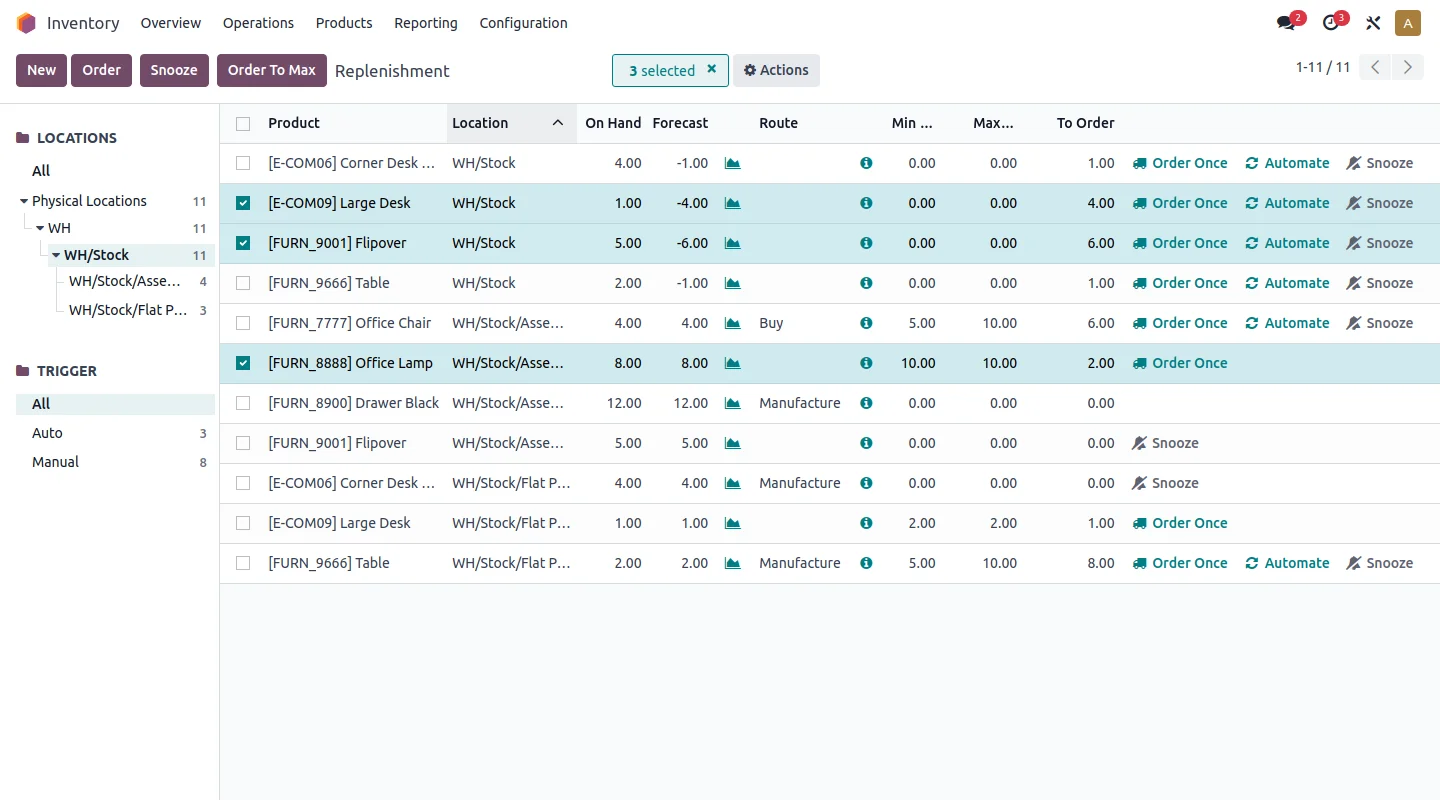
En 30 segundos. Implement Odoo for logistics & transport: warehouse locations, picking routes, expeditions, carriers & full traceability. Get the guide from Nextdoo.
Why logistics needs its own approach
A logistics operator doesn't sell products: they sell reliability. This focuses on inventory accuracy, preparation speed, and end-to-end traceability. A failure is not an internal problem; it's a wrong shipment reaching a customer. That's why the system needs to know in real time what there is, where it is, and in what state, and guide every movement in the warehouse. It shares a lot of logic with wholesale distribution, but with more emphasis on dispatches and transport.
How to implement Odoo in logistics step by step
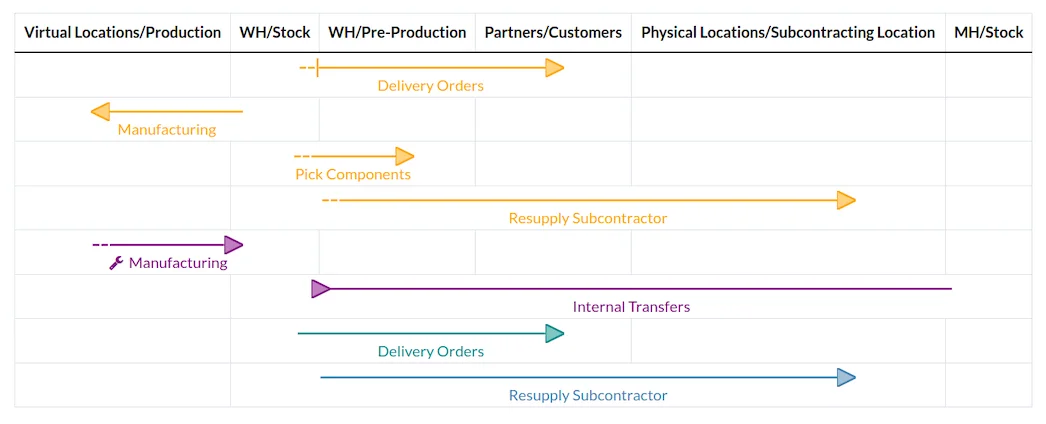
Step 1 · Warehouse with locations
The warehouse is structured into locations (zones, aisles, shelves) so that each item has its place and the system knows where to find it. It is the basis of all operations. Deliverable: mapped warehouse.
Step 2 · Reception and inbound control
It defines how goods enter: reception against order, quantity control, and automatic location. This way, the stock reflects reality from the first minute. Deliverable: controlled receptions.
Step 3 · Order preparation (picking)
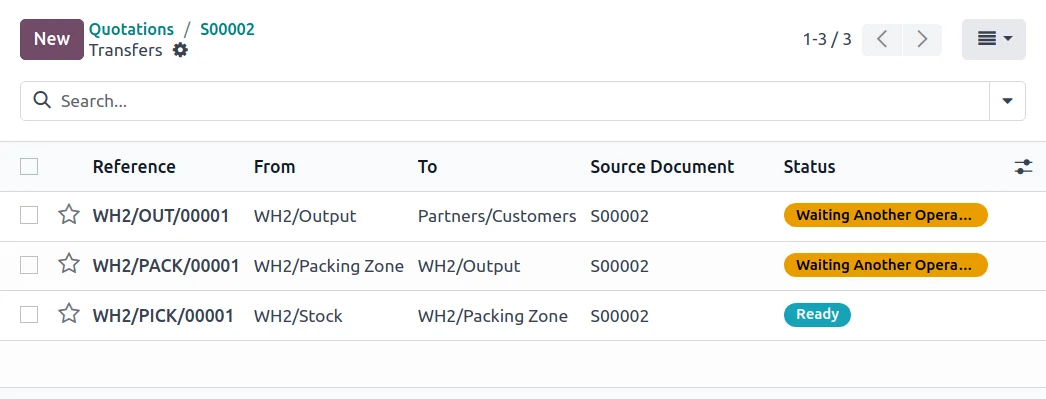
Preparation routes are configured, with a barcode reader so that each order leaves with the correct items. Fewer picking errors mean fewer returns and happier customers. Deliverable: guided and reliable picking.
Step 4 · Dispatches and carriers
Carriers are connected so that the label and tracking are generated automatically with each dispatch, without re-entering addresses. Deliverable: automated dispatches.
Step 5 · Traceability and cost per service
Traceability by batch or serial number is activated where needed, and the cost per route or service is controlled to know which operation is profitable. Deliverable: traceability and costs under control.
What a logistics operator gains with Odoo
- Reliable real-time inventory, without stocktakes that stop the warehouse.
- Fewer picking errors, and therefore fewer returns.
- Faster dispatches with automatic labels and tracking.
- Clear cost per route or service, to decide with data.
What can be automated in logistics
A large part of repetitive work can be taken off the team's shoulders. Goods' location upon receipt is suggested automatically according to rules. Preparation is guided step-by-step, so that a new operator performs from day one. Shipping labels and tracking are generated automatically upon confirming the dispatch. And notifications for pending orders, delays, or incidents arrive without anyone chasing them. The result is a warehouse that runs faster and with fewer errors, and an administration that stops reconciling papers manually.
What you need before starting
It helps to be clear about how the warehouse is organised (zones, locations), the list of carriers you work with, and which products require traceability by batch or serial number. It is also advisable to decide where to start —normally receipt, warehouse, and dispatches— and to have an operations manager to validate. The partner helps to organise what's missing.
Frequent errors when implementing Odoo in logistics
- Starting without organising the warehouse locations.
- Leaving order picking unguided and carrying over picking errors.
- Not connecting the carriers and continuing to stick labels manually.
- Trying to automate everything at once instead of going in phases.
With a partner experienced in operations these points are anticipated; it's best to choose wisely who you implement with. You have the general framework in Odoo implementation and the cost in how much Odoo costs.
How much does it cost and how long does it take?
| Scope | Indicative timeframe | Example |
|---|---|---|
| Basic | 6 – 10 weeks | Warehouse, receipt, picking and dispatches |
| Medium | 2 – 4 months | Multi-warehouse, carriers and traceability |
| Advanced | 4 months or more | Complex operations, fleet and integrations |
Indicative and non-binding timeframes and costs; they depend on the volume and status of your data. The cost breakdown, with no invented figures, in how much Odoo costs.
From dock to delivery: the flow in Odoo
The best way to see what changes is to follow an item. It arrives at the dock against a receipt order; the system suggests its location and, upon confirmation, the stock is updated instantly. When an outbound order comes in, Odoo generates the picking order with the optimal route through the warehouse, and the operator completes it with the scanner, without paper lists. Once finished, the dispatch is confirmed and the carrier label and tracking are generated automatically. The entire journey is recorded, so at any time you know where each order and each batch is. This continuous thread —receipt, location, picking, dispatch— is what eliminates transfer errors and lost hours reconciling delivery notes between the warehouse and the office.
What you can measure in your operations
A less visible but highly profitable advantage is that, with almost no extra effort, you start to have data that was previously intuition. You know how many orders each person prepares, which items generate more errors, which routes cost more than they yield, and where delays accumulate. With this, decisions are no longer made by guesswork: you can reorganise the warehouse so that the fastest-moving items are easily accessible, strengthen shifts during actual peak hours, or renegotiate with a carrier with data in hand. This shift from managing by feel to managing by data is often where the real savings lie for a logistics operator.
Frequently asked questions
Does Odoo serve as a Warehouse Management System (WMS)?
Yes. Odoo manages locations, receipts, guided order picking, and dispatches, covering the warehouse needs of a logistics SME without the need for a separate WMS in most cases.
Does Odoo connect with carriers?
Yes. You can integrate your usual carriers to automatically generate labels and tracking with each dispatch, without manually copying addresses.
Does Odoo manage traceability by lot or serial number?
Yes. It allows you to track each lot or serial number throughout the entire flow, which is essential in sectors with traceability requirements such as food or pharmaceutical.
Can I manage multiple warehouses?
Yes. Odoo manages multi-warehouse operations with transfers between them and real-time stock by location, useful if you operate from more than one logistics point.
Does Odoo comply with VeriFactu for invoicing logistics services?
The Enterprise edition covers Spanish invoicing obligations, including VeriFactu, mandatory in 2026, for invoicing your services in accordance with regulations.
Can I know the real cost of each route or service?
Yes. By allocating costs to its route or service, Odoo shows the real margin of each operation, which allows you to adjust prices and decide which services are profitable.
How long does it take to implement Odoo in logistics?
A set-up with warehouse, picking, and dispatches usually takes between 6 and 10 weeks. The timeframe depends on the volume, the number of warehouses, and transport integrations.
Does Odoo manage the transport fleet?
Yes. Odoo includes fleet management to control vehicles, maintenance, costs, and documentation, useful if the transport is owned and you want to allocate its cost to each service or route you perform.
Can I integrate Odoo with my current system or with clients?
Yes. Odoo connects via API with other systems and with clients or suppliers to exchange orders and shipping statuses, which is common when providing logistics services to third parties working with their ERP.
Do you want your logistics operations in Odoo, fast and error-free?
At Nextdoo, an official Odoo partner, we implement the warehouse and dispatches in phases, with verified data. Start with Odoo for wholesale distribution or request a diagnosis of your operations.
Source: official Odoo documentation (Inventory). Indicative and non-binding figures.
Sources
Official sources consulted: official Odoo documentation and e-headquarters of the Tax Agency (VeriFactu). Indicative and non-binding cost and timeframe figures, subject to variations depending on the project.